TCL Official TV Remote App
- 4.5
- Rating
- 10.00M
- Installs
- Free
- Price
 Analysis by App-foxy
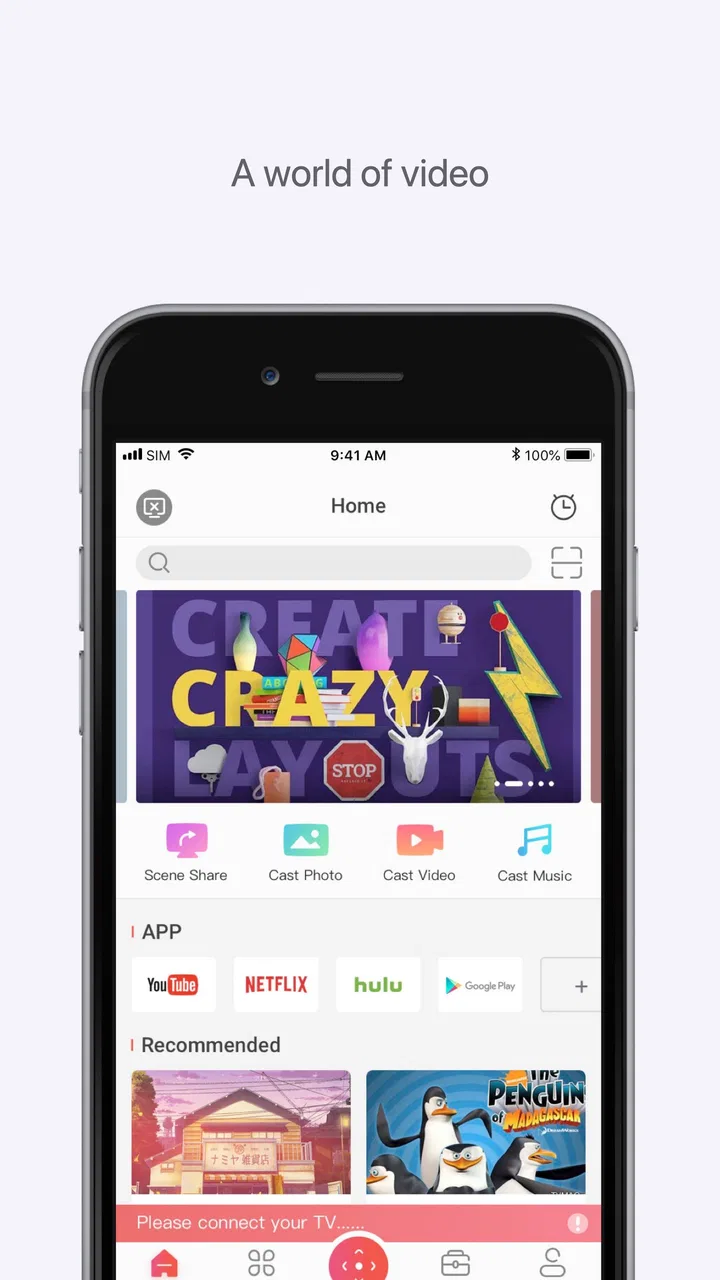
I tried the TCL Official TV Remote App as a practical companion for a TCL Roku TV, and my first impression was that it makes the phone feel less like a backup remote and more like a flexible control screen. It sits in the video players and editors category, but its real purpose is simpler: it combines TV control with ways to send local video, music, and photos to the television. The app is free to install, aimed at Everyone, and developed by TCL Group.
That combination makes it appealing in a very specific situation. If your physical remote is buried under cushions, if several people want to control the same television, or if you keep personal media on your phone, this app can reduce small points of friction. It is not a replacement for every media app or a universal solution for every television, though. Its usefulness depends heavily on the relationship between the phone, the TCL Roku TV, and the network connecting them.
Where the network changes the whole experience
The central lesson from using this app is that connectivity is not a background detail. It is the foundation of the experience. The remote functions are most useful when the phone and television can recognize each other properly. When that happens, tapping controls on a touchscreen feels convenient, particularly for ordinary navigation, playback, and selecting content. When discovery is slow or the devices are not cooperating, the app can feel much less immediate than picking up a physical remote.
You May Also Like

 Blood Strike: 2.5 Anniversary
Blood Strike’s Loadouts Turn Every Drop Into a Tactical Gamble
A close look at Blood Strike’s custom loadouts: how fast access to signature weapons reshapes its battle royale rhythm, rewards preparation, and narrows the gap between fights.

 Pandora - Music & Podcasts
Pandora’s Music Is Easy to Start, but Harder to Recover
Pandora’s strength is its low-effort path from a seed to a station. Its weak spot is how much confidence it asks you to place in connection, setup, and quiet recovery.

 8 Ball Pool
 Is Built on Rivalries, Rematches, and Routine
A close look at the rivalries, rematches, shared routines, and unanswered safety questions that turn a quick pool match into a persistent mobile community.

 Samsung Music
’s Quiet Strength Is Playing What You Already Own
Its reach comes less from spectacle than from dependable access to a personal library. That simplicity is both the app’s strongest retention engine and its ceiling.

 AccuWeather: Weather Radar
AccuWeather Review: A Quick, Clear Forecast for Everyday Decisions
For everyday plans, the best forecast is the one you can understand quickly. AccuWeather makes rain timing, radar, and local conditions easy to act on, with a few trade-offs.

 Hill Climb Racing
Why Hill Climb Racing Still Turns Crashes Into One More Run
A tiny car, a bumpy hill and one more upgrade: Hill Climb Racing keeps resurfacing because its simple chaos makes every near-miss feel personal.
More From Our News Desk



This is why I would set it up before an important viewing session rather than downloading it at the exact moment the original remote disappears. The setup process is part of the product experience, and giving the phone a moment to find the TV can save frustration later. A quick test of navigation and playback is also worthwhile. It tells you whether the app is ready for the household before someone is waiting to start a film.
In a shared home, the network angle becomes more noticeable. A television in a living room may be used by several phones, while guests may also try to connect temporarily. The app is most comfortable when you know which TV you are trying to control and when the phone is connected in the expected way. If multiple compatible televisions are nearby, paying attention to the selected device matters more than it would with a dedicated remote, because a touchscreen gives you fewer physical clues about where each command is going.
The casting tools add another layer. Sending local photos, music, or video from a phone to a larger screen is more useful than simply mirroring the phone for every situation. I found this especially practical for showing a group something stored locally, because the television becomes the shared viewing surface while the phone remains the browsing tool. The trade-off is that the handoff depends on a stable connection and on the TV being available to receive it.
The app is strongest when you treat connectivity as part of the setup, not as an invisible guarantee. That mindset leads to better results: open the app early, confirm the intended TV, and avoid assuming that a command will work just because the phone itself has internet access. A phone can be online while still having trouble reaching a particular television on the local network.
What the remote does better than a lost physical controller
A phone has one advantage that a basic remote usually does not: it is already in your hand. That sounds obvious, but it changes everyday habits. I can use the phone to control the TV without searching for a separate object, and the same device can also browse local media for casting. This makes the app feel less like a single-purpose replacement and more like a bridge between personal content and the living-room screen.
It is also useful when the physical remote is inconvenient rather than missing. During a group viewing session, one person may hold the phone while others choose what to watch. In another situation, someone can use the app to adjust playback without leaning across a coffee table. The value is not dramatic; it is the steady removal of little interruptions.
Still, a touchscreen remote has weaknesses. Physical buttons can be found by touch, while a phone usually requires looking down at the screen. If you are trying to pause something quickly in a dark room, the app may be less instinctive than a familiar controller. It also competes with notifications, calls, low battery, and the temptation to switch to another task. For people who want a dedicated, always-ready controller, a phone app will not automatically be an upgrade.
Using it away from the sofa
The mobile context is where the app earns its place. I can imagine using it while moving around the room, checking a photo collection with family, or selecting music without standing directly in front of the TV. The phone provides a more personal browsing surface than a television interface, especially when the content is already stored on the handset.
Local media casting is also a better fit for spontaneous moments than for carefully managed libraries. Suppose I return from a trip and want to show several photos to friends. The phone is already the place where those images live, and the TV gives everyone a larger view. That workflow avoids passing the phone around, but it still requires the devices to connect successfully and the selected media to be accessible to the app.
For video, the experience depends on what you expect from the word “cast.” This app is useful for sending supported local content toward the TCL Roku TV, but I would not treat it as a complete replacement for every dedicated streaming service. Services with their own accounts, recommendations, subtitles, and playback systems may still be better used through their official apps or the TV’s own interface. The TCL tool is most convincing when the starting point is your phone’s local media or when you need a straightforward remote.
Music is another interesting use. A phone can be easier for choosing an album or a personal recording, while the TV and connected audio equipment provide the room-filling output. The limitation is that the phone becomes part of the chain. If you need the handset for a call, navigation, or another task, the convenience can quickly become less important than using a dedicated player or the TV’s built-in options.
Recovery when the TV or phone stops responding
No remote-control app should be judged only by its best connection. The more revealing test is what happens after a failed command, a device change, or a temporary network problem. My practical approach is to check the selected television first, then confirm that the phone is connected as expected, and only after that try the command again. Repeated tapping is rarely helpful when the underlying connection has not recovered.
This recovery process is one area where a physical remote still feels more reassuring. With hardware, you usually know whether the batteries are the issue or whether the TV itself is not responding. With a phone app, several possibilities overlap: the app may be looking for the wrong TV, the network path may be unavailable, or the television may simply need a moment. The app cannot remove that uncertainty, so users should be comfortable with basic troubleshooting.
I would also avoid making the app the only control method during a setup change. If you are moving the television, changing network equipment, or preparing for guests, keep the original remote nearby until the app has been tested again. This is not a criticism unique to TCL; it is a sensible precaution for any phone-based TV controller. The difference is that the app’s value rises and falls with the connection, while a physical remote remains more self-contained.
Another useful habit is to close the loop after a failed cast. Instead of assuming that the media is playing because the phone accepted a tap, look at the television and confirm the result. This sounds basic, but it matters when you are sending content to a group. A quick visual check prevents the awkward situation where everyone is waiting for a photo or video that never reached the screen.
These small recovery habits also answer an important practical question: is the app suitable for children or less technical household members? It can be, especially for simple remote commands, but the first connection and any recovery from failure may require an adult. The Everyone rating describes the intended age suitability, not a promise that every setup will be effortless.
Being sensible with mobile data and battery
Because the app works with local video, music, and photos, I would use it with a clear distinction between home-network activity and mobile internet use. If the phone is away from the home network, the experience may not match what you expect from a living-room remote. I would not plan a casting session around cellular data or assume that a remote connection behaves like a local one. The safest routine is to use the app where the TCL Roku TV and phone are intended to communicate directly.
This matters for battery as well. A short remote session is unlikely to change how I use my phone, but browsing media, keeping the display active, and sending longer video can make the handset part of the viewing setup for an extended period. If I am showing a large collection of photos or playing personal music for a long evening, I would keep the phone charged rather than treating it as an invisible controller.
Privacy and attention are practical considerations too. The phone may contain personal photos and videos, so I would be careful when handing control to a guest. Selecting the intended item before passing the phone over is a simple way to avoid exposing unrelated content. I would also remember that notifications can appear while the phone is being used as the remote, which is another reason a dedicated controller can be preferable in a distraction-free setting.
The app includes in-app purchases priced from $1.99 to $5.99 per item, even though the main download is free. That makes it worth checking what is included in the free experience before paying for anything. I would only spend money if a specific extra solves a problem I actually have. For a user who needs basic TV control and occasional local casting, the free entry point is the main attraction; for someone expecting every advanced convenience without additional cost, the purchase model deserves attention.
How it compares with the usual alternatives
Compared with the original TCL remote, this app wins on availability and flexibility. The phone is easier to locate, and it can also act as a media source. The physical remote wins on tactile feedback, quick one-handed operation, and independence from phone battery and app state. I would choose the app for shared browsing and local media, but keep the physical controller for routine channel or playback commands when speed matters.
Compared with a generic universal remote app, the TCL-focused approach is more appealing if the household already uses a compatible TCL Roku TV. A focused tool has a clearer purpose than an app trying to cover every brand. The trade-off is obvious: people with several television brands, older equipment, or a mixed home-entertainment setup may prefer a broader universal solution, even if it is less tailored.
Compared with the TV’s built-in interface, the app gives local phone media a more natural starting point. Browsing photos on a handset can be quicker than navigating folders with a television remote. On the other hand, the TV interface remains the better choice for services already installed there, especially when you want account management, recommendations, or a playback experience that does not depend on keeping the phone involved.
The app’s audience is therefore quite specific. I would recommend it to TCL Roku TV owners who want a convenient backup remote and a simple route from phone-stored media to the big screen. I would be less enthusiastic for someone who owns a non-TCL television, wants a universal controller, dislikes troubleshooting network connections, or expects the phone to replace every part of a traditional remote experience.
What changed across the review period
The product has been available since September 1, 2020, and the current version is 2.0.198. That history suggests a mature companion rather than a brand-new experiment, while the current version is the one I would use when judging compatibility and behavior. The developer is TCL Group, which gives the app a direct connection to the TV brand it is designed to support.
Its public reception is strong: it holds a 4.5 average from around 162 thousand ratings, with more than ten million installs. Those figures do not remove the need to test it with your own television and network, but they do indicate that the app has reached a substantial audience. I see that as reassurance that the concept is useful beyond a narrow technical demonstration, not as proof that every household will have an identical experience.
The minimum operating-system requirement is Android 7.0, which keeps the compatibility threshold relatively accessible for many Android users. The app is free, with optional purchases in the range mentioned earlier, so the sensible path is to install it, test the core remote behavior, and then decide whether any paid item is relevant. That order protects you from paying before knowing whether the everyday connection works well in your home.
One final practical question is whether it is worth installing if you already have a working remote. In my view, yes, if you regularly show phone photos, music, or local video on the TV, or if more than one person needs control. If your only goal is to press buttons quickly and you never use phone-based media, the benefit is smaller. The app is helpful because it joins two jobs, not because it makes a phone inherently better at every remote-control task.
After looking at the network dependence, mobile use, recovery friction, and data-conscious habits, my verdict is favorable but conditional. TCL Official TV Remote App is a useful companion for the right TCL Roku TV household, not a universal replacement for a physical remote. I like the way it connects everyday phone content with a larger screen, and I appreciate having a backup controller available when the original is inconvenient. I would install it for a TCL Roku setup, test it before relying on it, and keep the physical remote close for moments when tactile speed or connection independence matters more.
FAQs for TCL Official TV Remote App
01What is the TCL Official TV Remote App, and what can it do?
The TCL Official TV Remote App turns a compatible Android or iPhone into a remote control for your TCL television. After pairing, you can usually adjust the volume, change channels, switch inputs, open applications, navigate menus, and use playback controls. Depending on your TV model and region, it may also include voice search, a virtual keyboard, screen sharing, or access to TCL smart features.
02Which TCL televisions and mobile devices are compatible with the app?
Compatibility depends on the exact TCL television platform, model, country, and version of the mobile app. It is generally intended for supported TCL smart TVs, including selected Google TV, Android TV, Roku TV, or other regional platforms, but not every TCL set works with every remote application. Before downloading, check the app-store listing and confirm that your TV model and phone meet the stated requirements.
03How do I connect the TCL Official TV Remote App to my television?
Your phone and TCL TV normally need to be connected to the same Wi-Fi network. Open the app, allow any requested local-network permissions, and select your television from the detected-device list. Some TVs require a confirmation code displayed on the screen. If the TV does not appear, check that both devices use the same network, disable conflicting VPN settings, restart the app, and verify that the television supports mobile control.
04Does the TCL Official TV Remote App work without Wi-Fi or an internet connection?
In most cases, the app communicates with the television through the local Wi-Fi network, so your phone and TV must be connected to the same router. An active internet connection may not always be necessary after the devices are on the same local network, but initial setup, updates, account features, voice services, or streaming functions can require internet access. It generally cannot replace a traditional infrared remote without network support.
05Is the TCL Official TV Remote App free, and are there privacy or permission concerns?
The official app is typically free to download, although available features can vary by region, television platform, and connected TCL services. During setup, it may request permission to discover devices on your local network, use the microphone for voice commands, or display notifications. Review the store listing and privacy policy before installation, and grant only permissions you are comfortable using. The app should not be treated as a universal remote for unsupported TVs.
Pros
- Simple interface makes basic TV controls easy to find.
- Useful replacement when the physical remote is lost or unavailable.
- Supports text entry from the phone keyboard on compatible TVs.
- Can adjust volume
- channels
- inputs
- and playback from one device.
- No need to keep another physical remote nearby for everyday commands.
Cons
- Works only with compatible TCL TV models and network configurations.
- Phone and TV usually need to share the same Wi-Fi network.
- Some advanced remote buttons may be missing or limited.
- Connection can fail after router
- TV
- or phone network changes.
- Using the phone as a remote may drain its battery during long sessions.

TCL Official TV Remote App
Gallery